
RogerHR
Product What's New · since 2021
Five years. An HRIS that has never stopped evolving.
This page traces the evolution of RogerHR since 2021: each delivered version, what it brought, and on what date. All of these updates arrived automatically for all clients, without any upgrade project, migration window, or service interruption.
250+
delivered versions
3,300+
improvements
45+
major capabilities
15+
integrated systems
2026
11 updates
80.0.0
New · MCP Server
New experience · beta
Delegation, AI in onboarding, and new experience

Three things at once. Approvals no longer stall because someone is on leave: you delegate your access and reclaim it upon return. Onboarding data is drafted from a document instead of being entered twice. And the new interface is activated when your team is ready, at your own pace rather than ours.
Delegation of permissions: delegate your access and approvals to a colleague during your absence
MCP Server: an AI assistant reads an employee's balances, timesheets, and schedules, and submits a leave request on their behalf
Also in this version
ProConcept and GIT WinEUR connected via the automation layer, for clients who use them
78.0.0
New · AI Agent
AI Agent

The assistant stops being a search engine that hands you a link. The agent can take action within the platform on behalf of a collaborator: answer the question, and then do what the answer implies. This is the difference between knowing the rule and already having the request submitted.
AI agent capacity activated in the platform
Also in this version
Clocking in and out via the public API
77.0.0
New · Electronic signature, New · Document templates
Electronic signature · beta
Electronic signature and document templates

The final step of most HR processes used to involve printing something. A contract or a letter is now generated from a template, with the employee's data already filled in, is sent for signature to all signataries, and is automatically filed back into their folder, all without leaving the platform or waiting for a scan.
Electronic signature: launch a signature from a workflow step, with multiple signers (behind a feature flag; ask us to activate it)
Also in this version
Employee data mapped to SAP and Triviso, configured client by client
76.0.0
The Swiss payroll chain

Payslips cease to be a monthly relay between two teams and two systems. SwissSalary runs from end to end, Abacus synchronizes employees and work patterns, and remuneration is converted between currencies in reports. A group with multiple entities and multiple payroll providers gets one process instead of three, each with its own way of going wrong.
End-to-end automated SwissSalary payslips
Abacus synchronization of employees and work patterns in production
Also in this version
75.0.0
The planner's day, shortened

A planner spends their day in the schedule, and every extra click is paid by the hour. Non-working hours are now hatched per person, tooltips provide the details, and filtering and sorting remain in the view. A leave request is created by clicking on the empty box where the absence should go: scheduling and absences cease to be two separate jobs.
Hatched non-worked times per person in the schedule, the gaps can be read at a glance
Tooltips, filtering and sorting without leaving the schedule view
Leave requests created directly from an empty box
Also in this version
Shift duration calculated on the server side, two screens can no longer contradict each other
Bulk editing of personal information, addresses, clock-in data, and contracts
73.0.0
New · Compensation
Remuneration

Salary is the most sensitive data in a company, and it almost always lived in a spreadsheet alongside the HRIS, visible to anyone who had the file. It now lives in the system that already knows who is allowed to see what: base salary, variable pay, and one-off payments, with an annual summary per person and the corresponding reporting.
Remuneration: base salary, variable pay and one-off payments, with archivable components and an annual summary
Remuneration dashboards and reports
Also in this version
Activation of SSO accounts done properly, with bulk activation and deactivation of access
Gunto (Sadies) connected via the automation layer, for clients who use it
72.0.0
Multi-entry forms

Some requests take up multiple lines, not just one: family members, a set of equipment, a list of dates. Forms now accept multiple entries in a single step and arrive pre-filled with already validated data. People correct what is there instead of re-entering what the system already knows.
Multi-entry forms, pre-filled with currently validated data
Also in this version
Saved filters on the times dashboard
Behind the scenes: nothing fails in silence anymore, the service stays up during an infrastructure incident, and browser-side protections have been strengthened
A code sent before any automatic send from a sensitive folder
Metric columns reorderable directly in the times dashboard
Payroll profile changes sortable by section
A dedicated permission for managing leave request attachments
Deleting a workflow or a form now warns you first
70.0.0
Abacus, and the foundations of the signature

Abacus becomes the next payroll system to connect, built on an infrastructure designed to fail loudly rather than silently: a synchronization that stops quietly is worse than one that never started. In the background, the document signing architecture in the platform is being shut down; the feature itself arrives in June.
Abacus integration infrastructure, with a real error handling strategy behind it
Electronic signature architecture finalized and provider's sandbox connected
Also in this version
68.0.0
Bulk payroll changes

The pay month means a hundred minor corrections under a tight deadline, and the deadline is precisely the cause of the errors. A single action now applies a change to multiple employees, and the timesheet table shows the clocking details behind each line: verifying a figure no longer requires opening a second screen.
Payroll modifications for many employees in a single action: right from the screen, or from your own systems
Clocking details visible directly in the timesheet table
Also in this version
Time balances are coming out of beta
Payroll data exchanged with MS2000 (Mediasoft) via the automation layer
65.0.0
Time, measured correctly

Hours worked and hours of absence were two separate answers that had to be combined yourself, and everyone combined them in their own way. The new time metric carries both: capacity becomes a single figure rather than an arithmetic exercise open to discussion. Furthermore, a fixed-term contract can no longer be registered without an end date.
A new time metric type including the leave balance
End date is now mandatory for fixed-term contracts
Also in this version
Calendar Integration API
Deletable departments across all versions of the structure
Interviews in calibration now show up as an expected action, instead of waiting in silence
Bulk adjustments close without waiting for the background refresh
Rebuilt payroll change table, grouped rows remain readable at a large scale
64.0.0
New · Teams
The teams, and terminals that configure themselves

Not every group that matters is a department: projects, rotating teams, and locations cut across the structure. Teams do too, and they filter everywhere in People. At the same time, a new time clock is provisioned from the platform: assign it to a location, and the employees and badges it needs will get there, without anyone having to configure the device.
Employee teams, cross-departmental, with filters everywhere in People
Device provisioning: assign readers to a site and push employee and badge data to it
Also in this version
Time categories, and a new absence dashboard
Strategic ERP (BMC) starts exchanging data with Roger via the automation layer
Job levels, and the tables to manage them
Paid breaks generated between worked shifts, no longer just around them
Contract duration integrated into time metrics
The weekly digest skips people who wouldn't see anything in it
2025
17 updates
63.0.0
New · Performance Review Calibration
Calibration of interviews

A rating does not mean the same thing from one manager to another, and the gap becomes visible (and costly) as soon as they are compared for promotions or salaries. Calibration puts an entire population side by side, allows for batch adjustments, and locks in preparation feedback so that the trace of what was said before survives the adjustment.
Calibration of an interview or an entire batch, with tables for skills and objectives
Preparation feedback locked right from the start of the calibration
Objective groups and weightings, with an average score per group
Calibration submitted for a single employee, not only for an entire batch
Default weighting groups created for those who did not have any
Weightings distributed even when objectives are already closed
Also in this version
The site included when an expense report is transmitted to another system
61.0.0
Search from anywhere, and leaves that grant themselves

A version made of small things felt every day. Search is just a keystroke away from anywhere. And extra days off acquired through age or seniority are now granted by a rule set once, instead of a spreadsheet that someone rebuilds every January and sometimes gets wrong.
One keystroke to search from anywhere within the platform
Additional days off granted automatically based on age or seniority
Also in this version
A security code for sensitive files, applied even in cases of identity theft
MyCerty connected via the automation layer, at the clients who use it
60.0.0
Dashboards shaped by you

A single dashboard for everyone suits no one, and the usual result is that everyone exports to Excel. Dashboards become pages with their own permissions: finance, HR, and a department head each open the view they actually need, and grouping applies to a metric rather than the entire page.
Dashboards become pages with their own permissions
Group by a single metric instead of the whole page
Also in this version
A "sensitive" marker on folders, and a customizable logout URL per client
58.0.0
New · Workflow forms
Workflow forms

Most HR processes come down to a question waiting for an answer before the next step, and this question usually travels by email. Build the form, attach it to a step, and the request, approval, and resulting data stay together: nothing waits in an inbox that no one else can see anymore.
Workflow forms: build one, attach it to a step, and then submit, approve, reject, or resubmit
Also in this version
An audit log on each line, to see who changed what and when
Read multiple sheets at once, and rotate or search inside a PDF without leaving the file
Loading states on leave types, breaks, work patterns, and timesheets
Timesheet editability resolved by a single rule instead of several
Contract columns behave the same way in all tables
56.0.0
Skills meet jobs

A competency framework only begins to pay off its cost once it is linked to the organisation. Competencies now belong to roles and role levels: the distance between a person and the next level becomes something the system can show them, and a development discussion starts based on facts rather than impressions.
Skills assigned to positions and job levels
Also in this version
A weekly digest for managers by email, so that nothing waits for a login
Schedule balances read timesheets up to yesterday and the schedule for the future
54.0.0
New · Organization Versioning
The organizational chart acquires a history

Reorganizations quietly destroyed last year's figures because the structure on which a report had run was already overwritten. You now draft a new structure, publish it when it takes effect, and each previous version remains intact: a report on March still describes the company as it was in March.
Organization versioning: draft, publish, and keep each previous version for reporting
Also in this version
Recurring leaves and leave request groups
Access is automatically deactivated at the end of the contract
Dynamics 365 starts exchanging data with Roger
53.0.0
New · Webhooks
Webhooks

Until now, other systems had to ask us what had changed, based on a schedule, and work on data that was already a few hours old. Now we notify them within the second. A nightly synchronization becomes immediate, and the platform becomes something that your own tools can build upon rather than loop-query.
Webhook events pushed to third-party systems, with a copyable automation example
Also in this version
The Therefore connector, for documentary and archiving workflows
52.0.0
Receipts that read themselves

Expense reports are submitted late because of the entry process, not the expense itself. Photograph the receipt, and the amount, date, and currency are filled in automatically: the employee confirms instead of retyping, and the finance team receives the report in the month it occurred.
Take a picture of a receipt and the expense report fills itself out
Also in this version
Bulk document upload, significantly faster
Bulk settle a timesheet counter to zero
Conditions on a workflow step, so a step can wait for what precedes it
Workflow permissions distinguish who can launch one from who can act on it
Dashboards load on demand, and each metric opens its own detail
Form fields pre-fill from what the record already knows
51.0.0
New · AI Writing
Our first AI feature

Writing a job description from a blank page is the slowest step in opening a position, and that is why positions remain unfilled. It now writes itself in the editor where you already were: the work becomes proofreading rather than starting from scratch, which makes for a very different afternoon.
AI-generated job descriptions, written in the editor you already use
Also in this version
Skills development returned to the employee over time
Task deadlines relative to step activation, rather than fixed dates
50.0.0
New · Workflows
Workflows

The engine on which everything else has been built since. Define the steps, the tasks, what triggers them and who is responsible for each, and a process like hiring or onboarding runs on its own instead of living in a checklist on a desk. A new hire can now be approved or rejected before even existing in the system.
Workflows: steps, tasks, triggers and assignments, with a My tasks page and a tab on each record
End-to-end recruitment and onboarding, with pending arrivals that you approve or refuse
Also in this version
Restrict API access to your own network addresses, and control who can see sensitive fields
Cost centers assigned with validation, no longer entered as free text
Contracts created between two existing contracts, without rebuilding the history
A "work permit" section delivered by default with the product
Therefore integrations point to the customer's own viewer URL
48.1.0
Who is pointed at, now

This question is asked twice: during an evacuation drill, and during a payroll dispute. Both times the response had to be immediate and it was not. There is now a single export of all currently clocked-in individuals, regardless of the method used.
An Excel export of all currently clocked-in people
Also in this version
Ads become translatable
Job titles can be archived rather than deleted
Workflow steps acquire tasks: created, modified, and removed from the step itself
My tasks only displays what is still active
Assignment types translated, so that a task says who it is waiting for
Expense claim names can be repeated from one group to another
47 .0 .0
New · Expense reports, New · Time clocks
Expense reports, and wall-mounted badge readers

Two arrivals in a single version. Expense reports become a complete module: submit, attach, approve, audit, and send for payment, right from a phone if that is where the receipt is. And for teams that clock in physically, fingerprint and badge terminals now feed directly into timesheets and open doors: we sell the system, the device is just hardware.
End-to-end expense reports: categories, VAT, attachments, approvals, send to payment, mobile capture
On-site clocking-in terminals: fingerprint and badge terminals TimeMoto and ZKTeco for clocking in and door opening
Also in this version
A real pre-hire status in the lifecycle, plus arrival, departure, and manager ratio metrics
Pre-filling of the contract, with the end of the probation period validated upon entry
Personal email and phone number collected in the hiring workflow
Multiple Opale connections per third party, each with its own error management
Duplicate uploads blocked in the file picker
45.0.0
New · Metrics and dashboards
Metrics

HR reporting ceases to be an export that someone does on Friday for a Monday meeting. Staff turnover, FTEs calculated from actual work patterns, absenteeism, and leave balances live on a dashboard that is up to date every time it is opened. Public holiday calendars also learn half-days, which matters a lot in a country that has them.
Metrics and dashboards: turnover rate, FTE from work patterns, absenteeism, leave balances
Half-days in holiday calendars
An empty state on dashboards, instead of a white rectangle
Also in this version
Expense report foundations: currencies, taxes, categories, mileage reimbursement
An expense report profile page, with submission and confirmation before sending
A page dedicated to already paid expenses
Expense reports created directly from the profile page
42.0.1
Security of uploads, and bulk editing

Everything a collaborator can upload is an entry point into the system, and HR platforms receive a lot of them. Files are now controlled by type and scanned at storage before anyone opens them. In the same version, bulk editing arrives for contracts: a change for one hundred people becomes a single action instead of a hundred.
Only allowed file types can be uploaded, everything stored is scanned, and a browser-side vulnerability has been closed
Bulk modification of contracts
Also in this version
40.0.0
The interviews, reconstructed around the conversation

An interview is a conversation, and the software kept treating it like submitting a form. HR can now enter a cycle at any time instead of waiting for it to close, managers have a page that remains private for as long as it needs to be, and a rejected timesheet carries its reason: nobody has to ask why anymore.
HR can enter a review cycle at any time instead of waiting for its closure
Manager private questions move to their own page
Leave a comment when rejecting a timesheet: rejections stop being mysterious
Employees access their own feedback before the review, not after
Also in this version
Request a modification on a section of your own profile, rather than writing to HR
A rejection window that captures the reason, wherever something can be rejected
The employee search matches any word in a title, not just the first one
38.0.0
Timesheets that approve themselves

Most timesheets are correct and yet still wait for a manager who has forty of them. Set a tolerance and those that fall within it approve themselves: attention goes to the few that actually differ, which is the only part where a manager's judgment was necessary.
Auto-approval of timesheets falling within a tolerance that you define
Also in this version
Labeling of documents in folders, and planned ratio in the schedule
Test environments have their own color, so that no one demonstrates the wrong one
Leave requests processed in batches rather than one by one
One color per leave type, also used on the settings page
Employee skills filterable by category
Paid breaks can overlap
36.1.0
New · Skills Matrix
Skills matrix

Individual skill profiles answer questions about a person. The matrix answers questions about the company: who can cover this, where is the single point of failure, what should we train on next quarter. Succession gaps stop being anecdotes that managers bring up and become something that can be pointed to.
A skills matrix showing the capability of your entire population on one screen
Also in this version
Access granted by entity and department hierarchy rather than by manually maintained lists
2024
16 updates
34.0.0
Disaster recovery, tested

A backup that no one has ever restored is a hope, not a plan. Data is now replicated across regions, and the recovery procedure has been repeated from end to end: "what if" has a tested answer with a measured duration, rather than a paragraph in a policy.
Multi-region backup, with a repeated rather than documented recovery process
Also in this version
Audit trail on objectives
32.0.0
Security hardening

The month when the platform itself received as much attention as the features running on it. Threat detection, encryption at rest, blocked public storage, and monitoring of the entire delivery pipeline: the precise answers an IT department wants before signing anything, prepared before being asked.
Threat detection enabled, encrypted volumes, public storage access blocked, monitored infrastructure
Also in this version
Archive and unarchive custom fields, sections, and leave types: nothing disappears by surprise
A status "reviewed for payroll", so payroll and HR stop chasing each other
31.0.0
Leave in hours and in days

Some absences last a morning, not a whole day, and forcing them into full days discretely corrupts the balance. Leaves are now tracked in hours or days depending on the type, with a negative balance flagged in red before the approver commits. Contracts gain a complete history: a rehire or a correction no longer overwrites what was true last year.
Hours or days depending on the type of leave, with negative balances flagged before approval
Contract history: modification, rehire, and deletion, each tracked
Unpaid leave no longer counts towards the total, and public holidays are added
A business rule specific to hourly work patterns
Also in this version
Manual clocking, and a new lateral navigation
A mandatory comment per skill level, so that a grade always carries its reason
Recurring timesheet adjustments correctly calculated on a pro-rata basis
30.3.0
Everything becomes translatable

A multilingual company should not expect half of its staff to read HR materials in a second language. Skills, goals, leave types, and folder labels are now translated: each employee sees the platform in the language in which they were hired, and adoption no longer depends on everyone's proficiency in German.
Skills, objectives, leave types, and case labels, all translatable
Also in this version
Third-party integration logs, and a downloadable Excel permissions audit
Recurring timesheet adjustments; region and country on sites
30.0.0
The Swiss employee file, complete

A Swiss HR file needs fields that a generic system simply does not have, and the gap is usually filled by a spreadsheet on someone's desk. Work permits, withholding tax, spouse and children, CLA insurance models become first-class objects here, and the same person can hold multiple contracts between entities without being entered twice.
Work permit, withholding tax, spouse and children data, CLA insurance models
Multiple contracts for the same person: the multi-entity reality, handled correctly
The Opale payroll connector extended to carry the GLN and tax sections, with employee creation failures handled correctly
Also in this version
Collaborators notified as soon as an announcement is published
29.0.0
New · Payroll integrations
Our first payroll connector

The first integration that removed a recurring task rather than adding a feature. Employee data flows in both directions with Opale: payroll preparation stops depending on someone remembering to report a change, and the two systems stop quietly disagreeing on the same person.
Opal: the first two-way payroll integration in production
Also in this version
Job families assigned to job titles
28.3.0
New · Organizational chart, New · Time analysis
Organization chart and time analysis

Two questions that each required a spreadsheet now have their own page. The organizational chart shows the company as it actually reports, respecting who has the right to see whom. The time analysis replaces the old overtime module with the numbers behind the hours, including an alert when someone exceeds the daily legal limit: a compliance issue that we want to catch early.
An interactive org chart that respects rights
Time analysis: page and API, replacing the removed overtime module
Monitoring of legal daily limit exceedances, paid break caps, and department goals
Also in this version
The list of contributors loads on scroll rather than all at once
Advanced work patterns can now be deleted, not just deactivated
An evaluated contributor sees peer and upward questions in their summary
Start date displayed on onboarding and offboarding interviews
28.1.0
Cost centers, and a true organizational tree

Finance and HR stop maintaining two versions of the same company. Cost centers map to departments and contracts and are retrieved via the API, while departments become a true tree structure with legal entities above the sites. Reporting by cost center or by entity becomes a filter rather than a whole afternoon's work.
Cost centers on departments and contracts, readable via the public API
Departments become a tree structure; legal entities are placed above sites
Also in this version
German is here, and interview templates are now translatable
Unique department names and job titles, so two teams don't quietly drift apart under the same name
Job board settings are now visible to anyone who can manage jobs
A default fallback translation, so a missing label is never displayed blank
27.1.0
New · Skills
Skills
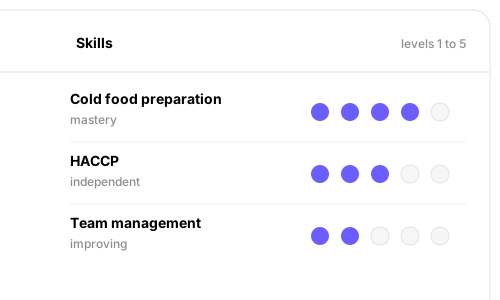
Performance discussions are acquiring a common vocabulary. Define the skills a position actually needs and the levels that describe progression, then refer to them in any interview: "making progress on this" becomes a precise and comparable statement that two managers would recognize in the same way.
Competency assessments with levels, and categories carrying a description for each level
A competency block available in each interview template
Also in this version
A dedicated tab gathering each individual interview
27.0.0
Zero-downtime deployments

Every version before this one required customers to accept a brief interruption, which is the hidden tax of delivering frequently. From here on, updates arrive while people are working, which is precisely why the ninety-five subsequent versions were able to arrive at this pace without anyone having to plan around them.
Versions no longer interrupt the service, at any time
Also in this version
Hierarchy of departments: the beginning of a true organizational structure
26.1.0
Time off, the way we really take it
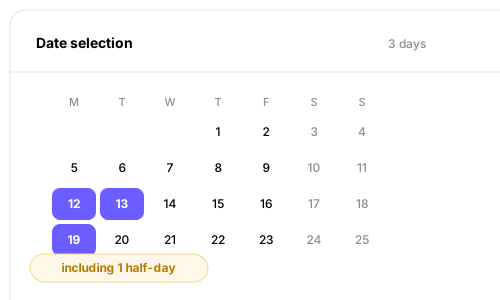
Requesting three scattered days used to mean three separate requests and three separate approvals. Now, you can select the desired dates in a single gesture, and longer requests offer half-days instead of imposing a full day. Timesheet rules are now based on work patterns: you configure a pattern once instead of repeating yourself for each one.
Multi-date leave selection, with suggestions for half-days on long requests
Timesheet settings move from employee to work patterns
Also in this version
26.0.0
New · Announcements
Ads

Company news used to live in email threads that no one could find three weeks later. Now, you publish an announcement with images and formatting, target it only to the relevant sites or departments, and see exactly who it reached: in a system that already knows who works where, the audience defines itself.
Publish with rich text and images, targeted to specific sites or departments
See who an announcement has reached, and edit or delete it afterwards
Also in this version
A new employee homepage with a feed and events that are worth the click
25.9.0
Sales on time that make sense
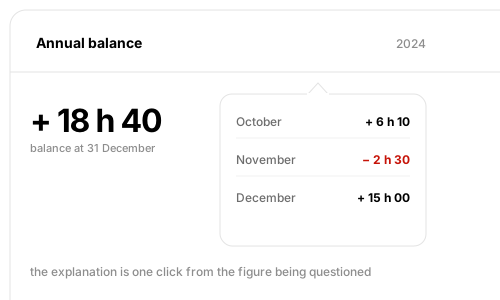
When an employee disputed their hours balance, someone in HR had to manually reconstruct the year to answer them. The balance now opens its own annual breakdown: the explanation is just a click away from the disputed figure, and the conversation stops there instead of becoming a ticket.
An annual balance breakdown on timesheets, in a tooltip on the number itself
Also in this version
Seniority dates calculated automatically rather than maintained manually
25.8.0
Locks that refuse to lie, and paid breaks

A lock that closes on pending work is worse than no lock at all: it certifies a period that was never complete. It now refuses. And paid breaks extend to Saturdays, then to all types of public holidays.
A period cannot be locked while timesheets, leaves, or schedules are pending
Paid breaks on Saturdays, then on all types of public holidays
Also in this version
Leave corrections only count if a contract exists on that date
Leave beyond a given number of days flagged as requiring supporting documentation
A "direct reports" column in the reports module
Managers allowed to see other feedback during preparation, when the option permits it
25.2.2
New · Period Lock
Lock a period

Payroll needs a line after which nothing moves. Timesheets, schedules, and leaves lock together up to a chosen date, and the clock-out now forces anyone who has not taken a break to declare it: an unregistered break is a legal problem, not a rounding error.
Timesheets, schedules, and leaves locked until a chosen date
Clocking out requires declaring the absence of a break
Also in this version
Leave types that prohibit overtime reset the daily premium to zero
Each report column carries a default format from its creation
Custom sections and tables readable via the public API
Permission checks resolved in one place, screens open faster
The mobile directory no longer reports "on leave" for worked-type leave
25.0.0
Paid breaks, and premiums in full view

The extra hours that nobody notices are hours that nobody pays for. The overtime premium goes back to the top of the timesheet. Paid break conditions become configurable, and clocking in on a Sunday ceases to be possible by accident.
Paid break conditions, configurable
The time overtime displayed at the top, so that extra hours do not go unnoticed
More flexibility on nighttime work overtime pay
Clock-in and clock-out blocked on Sundays and public holidays
Also in this version
The clock-out opens a confirmation containing the zone and a comment
Schedule positions assigned directly from the employee profile
"Modified by" and "modified on" extended to reports, custom tables, and addresses
2023
8 updates
24.1.0
Interview reporting

A review cycle produces a lot of writing and, until now, there was no way to look at it as a whole. A report now covers every piece of feedback from a cycle.
A report covering each piece of feedback from a review cycle
Also in this version
Leave policy reports moved under Leave reports
Filterable reports on a list of employee IDs
A toggle removing a leave type from self-service
A time profile option hiding the list of breaks on timesheets
Goal descriptions made mandatory
24.0.0
Reporting gets a backbone

Reporting is no longer a game of frozen screens. Each type of report now publishes the fields it can carry, with its own column order. This is what later makes a report something we compose rather than something we request.
Each type of report publishes the fields it can carry, with a saved column order
Also in this version
Anyone with read access to a folder is notified when a document arrives in it
Changeable login method for a centrally managed company
A scheduling option that keeps recurring shifts on public holidays
Compensatory time excluded from the planning total
Custom numeric fields validated to ten digits and two decimals
21.6.9
An audit trail for everything

Who changed this, and when. Recorded on every record and readable via the API: the first question an auditor asks, and the one an HR system should never answer with a shrug.
Who created a record and who last modified it, kept on the record itself and readable via the API
Also in this version
Hourly leave only frees up the hours actually in conflict, not the entire day
Multiple documents uploaded within the same custom section field
Batch timesheet adjustments via the public API
The interface refreshes itself when its version no longer matches the server
Address imports no longer duplicate a start date
21.4.0
Documents in the employee folder

A work permit, a diploma, a certificate: these belong to the person, not to a file elsewhere. The customizable profile acquires a "document" field type: the form that a company has designed for itself can carry its own papers.
A "document upload" field type in custom profile tables, both client-side and server-side
Attachments on a field, previewable without downloading them
Also in this version
Contract type modifiable when the start date changes
Marital status bearing the date on which it took effect
Time compensation cards uploaded to the leave tab
21.0.3
Leave conflicts, and a signable timesheet

When a validated leave conflicts with a scheduled shift, someone has to decide which one gives way. This decision becomes a settings adjustment rather than a habit. And the timesheet export is designed to be printed and signed, because in Switzerland this is still often the case.
Conflicting leave requests refused right away, except next to a sick leave
A planning setting deciding what a validated leave does to a conflicting shift: release the employee, or delete the shift
An Excel export of timesheets designed to be printed and signed
Also in this version
Other managers notified when a leave is approved or rejected for a person they also supervise
Multiple-choice fields in the employee profile
Hourly leave types display duration and balance in hours, not in days
20.0.1
The objectives, and a schedule that we manage

The objectives align with the interview cycle, maintaining a trail of comments at each status change: a year-end rating can be traced back through the year that produced it.
Goals in the review cycle, with a history of comments at each status change
A goals block available in the feedback preparation step
Goal status updates subject to their own permission
Planning permissions that by default copy all scheduled employees into the read group
Holidays highlighted in the planning calendar
Also in this version
A leave cycle that follows the employee's time management profile
Surcharges that are calculated automatically, and simplified timesheets

An increase that no one can explain is a dispute in the making. The night and weekend surcharge now shows its own calculation in a tooltip on the timesheet. And for teams that only count hours, the timesheet completely drops the start and end times.
Markup multipliers on timesheets, with both the calculation and the resulting figure displayed
Night and weekend markups displayed in a tooltip, so that the figure can be explained
Automatically calculated breaks when they are missing
A simplified timesheet based on a number of hours rather than a start and end time
Also in this version
Custom table sections in the collaborator profile
Schedule colors driven by the zone, as the mobile app already showed
Attachments on leave requests, carrying their actual name and type
Adding a timesheet loads what has already been entered that day
Schedule planning, and shifts that know when to stoptimes that know when to stop

Recurring shifts that outlive a contract are the kind of sneaky error that no one catches before payroll. They now stop on their own. Hourly staff finally appear in the schedule, and editing it requires its own permission.
Hourly employees appear in the schedule for all their open days
Recurring shifts automatically stop at the end of the contract
Modifying the schedule requires the MANAGE_SHIFTS permission
Also in this version
A final comment on the evaluations, included in the confirmation email
The manager notified when an employee submits their self-evaluation
Pending leaves sorted more clearly in the file, cancelled leaves hidden
2022
6 updates
Cross-interviews, and the first increases

Feedback ceases to be a single line from a single manager: upward and peer reviewers arrive, and history survives a change of position during the year. In parallel, the timesheet learns Swiss premium rules: weekends and public holidays start calculations automatically.
Upward and peer reviewers, listed on hover in the feedback list
Feedback history preserved when someone changes positions during the year
A user cannot submit a self-assessment on behalf of another
Access to reviews governed by the permission "access employee reviews"
Timesheet premiums for Saturdays, Sundays, and public holidays, calculated like overtime
Also in this version
Night shifts displayed from afternoon to morning, including recurrence
Break durations beyond the standard set, up to 105 minutes, on shifts and timesheets
Timesheets originating from a half-day leave retain the second half
Email activation links that work once, and only once
New · Interviews
Interviews

Performance gets its own module instead of living in a spreadsheet. Templates, a launch wizard, a management dashboard, the feedback form itself, and review permissions join the groups that already govern everything else: who can read what becomes a single system, not two.
Interview templates, created and managed from a dedicated Interviews section in the menu
Launch an interview via a wizard, and track each cycle from a management dashboard
The feedback form itself, and submission for manager's validation
Interview permissions as first-class objects, alongside existing groups
Also in this version
Shift templates suggested as soon as an empty slot on the schedule is clicked
A view by zone, with shifts sorted by time and then by role
Night shifts: a shift that ends the following day
Skill and level descriptions up to 400 characters
Sick leave drives the timesheet calculation from the actual incapacity
New · Timesheets
Timesheets

Hours become a first-class object rather than a column in a report. Creating, editing, importing, and tracking come together, on web and phone, and the system starts telling you which ones are missing instead of waiting to be asked.
End-to-end timesheets: create, edit, search, and a monthly page per employee
A mobile view of timesheets, and a year selector on the monthly page
Excel import, and a missing timesheets counter displayed on each employee
Detection of missing timesheets that also catches days where the only entry had been rejected
Empty sheets filled automatically, on the dates you choose rather than all of them
Several time slots added at once
Shifts automatically included in timesheets, as a company setting
Timesheet permissions, linked to the 2021 permission groups
Also in this version
Leave calendar filters (site, job title, type, status) with a level of detail driven by the reader's rights
Swiss default settings, and filters everywhere

A new company should not have to set up Swiss leave law from scratch. The default values already come in right, dates read as they are read here, and every list finally filters the same way.
Leave configuration initialized from Swiss law
Swiss date format consistently applied across all tables
Standard filters on all leave and overtime pages
Upcoming and past leave separated in the employee view
Employees with only non-worked shifts hidden from the displayed period
Also in this version
Survey results that hold up, and the first breaks

A survey result that cannot be trusted is worse than no survey at all. Templates enforce each language before publication, scores arrive with the number of people behind them, and grouping is calculated once rather than being re-derived each time it is displayed.
Survey templates, with each language label mandatory before publication
Average score by category, and by category broken down by group
The number of respondents displayed on each group
Overtime breaks
Also in this version
Bulk assignment and unassignment indicating how many people changed and how many did not
Leave and overtime tables enriched with site and job title
Filters by job type and site on the approvals screen
New · Surveys
Surveys

Asking people how they are doing is easy; asking it in a way that they will answer honestly is not. Anonymity is decided answer by answer by the writer, skipping a question is allowed, and any subgroup of fewer than five responses is grouped together: a small team cannot be reconstructed from its own feedback.
Create a survey, add, modify and delete its questions, duplicate an existing one
Surveys in multiple languages
Employees decide, answer by answer, if their free text remains anonymous
Employees can explicitly skip a question instead of being forced to answer
Any subgroup of fewer than five responses is grouped into "other", no one becomes identifiable in the results
Results grouped by site, gender and other subgroups
Everyone notified at once when a survey opens
Also in this version
2021
4 updates
Permissions that apply automatically, and profiles in all languages

The summer permissions model gets some teeth: restricted creation rights, approvals that trigger on their own rules. And the customizable profile learns to speak: field definitions carry their translations, the form a collaborator sees is in their language.
Create a company space, or a user, reserved for system administrators
Auto-approval rules for leaves and overtime, at creation and modification
Administrators can delete cancelled leave and overtime requests
Custom fields, sections and tables ordered exactly as you want them
Multilingual profile field definitions: the form template speaks the collaborator's language
Also in this version
A rounding option on leave request durations
SSO logout completely clears the session
Health checks that are triggered when an environment goes down
New · SSO
Azure SSO, and contracts that hold up

Two hardenings at the same time. Identity moves to the directory that the company already operates, and the contract file stops accepting states that do not make sense: you cannot delete someone's only contract, and an illness with no known end date becomes a case treated as such.
Azure SSO Connection, the identifier and password fields are hidden behind
Multiple contracts per employee, and the last remaining one can no longer be deleted
Sick leave with an unknown end date
Incapacity displayed for ongoing illnesses and accidents
Also in this version
Leave split at the end of each month, so that payroll gets clean monthly figures
New · Permissions, New · Custom fields
Permission groups, and a profile that you define

Two decisions made here still shape the product. Access stops being a role chosen from a list and becomes groups that you compose: collaborator permissions and company permissions on separate axes. And the collaborator profile ceases to be frozen: a company adds its own fields and sections and arranges them as it sees fit.
Generic access groups, interface-side and server-side, with a set of default groups delivered out of the box
Custom employee permissions and company permissions: the two axes remain separate
Companies define their own employee fields and sections, displayed in the order of their choosing
Also in this version
A single leave policy per employee and per cycle, assigned and withdrawn in bulk
Leave history separated into requests, grants, and adjustments, each with its own table
Corrections recorded as explicit transactions, not silent modifications
Rollover and pro-rata down to the leave type level
Accruals recalculated across an employee's different contracts
New · Time Off
Leave, from end to end

The first thing a Swiss company expects from an HR system is leave that corresponds to its own calendar, not a generic one. Public holidays, leave types, and approval become the company's business, and each request ends up in a single queue with a counter on it.
Custom public holidays that the company maintains itself, including closing days
Custom leave types, and custom leave activity types
Approve and reject leave requests, with a counter for those pending your action
Also in this version
Customized employee groups
Company-wide general settings

Book a meeting to discover how Roger can simplify your day-to-day HR work and improve the employee experience.
Demander une démo